
Arzel Zoning
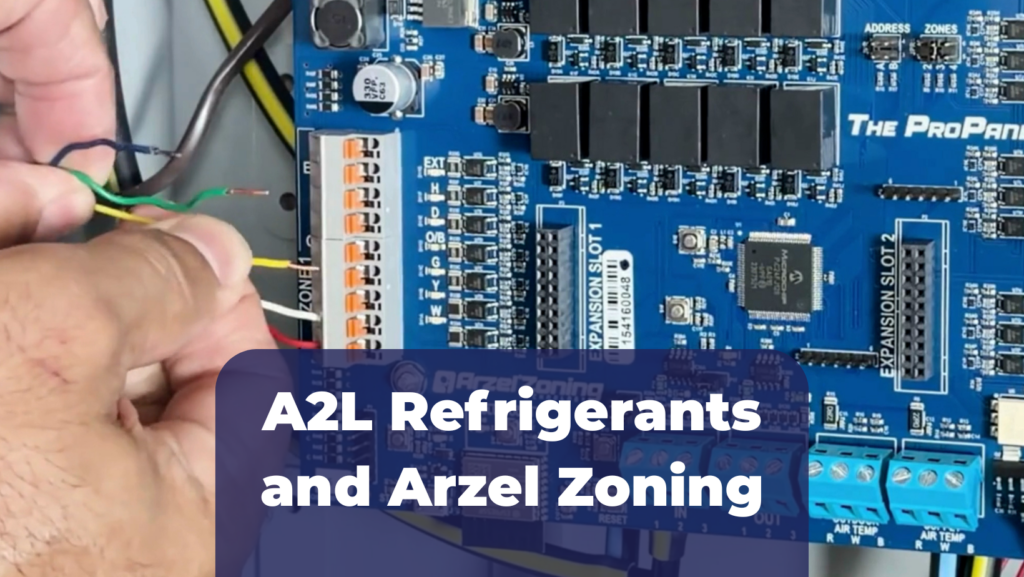
The introduction of A2L refrigerants like R-32 or R-454B has caused changes in the HVAC industry. When you’re working with A2L refrigerants and Arzel Zoning systems, it’s important to understand the refrigerant detection system (RDS) and A2L mitigation controls that are built into the equipment. Here’s what you need to know.
Indoor units and package units that are designed for A2L refrigerants have a refrigerant detection system (RDS) because A2L refrigerants are mildly flammable. If there is a leak, the system needs to respond by dispersing the refrigerant.
The RDS includes a sensor that detects refrigerant and a mitigation control board that responds. Manufacturers might refer to these as mitigation boards, mitigation controls, or just the RDS.
In some cases, UL indicates that all zoning dampers need to be opened when a refrigerant leak is detected. HVAC equipment manufacturers specify how much airflow is required to disperse the refrigerant. If zoning limits the airflow below this level, then dampers should be opened during a leak. If you aren’t sure how much the zoning blocks airflow, you can play it safe and follow our guidelines for connecting the zoning panel to the RDS.
When you’re installing A2L equipment with Arzel’s Pro Panel, you can connect the RDS to a designated contact on the zoning control board to accomplish this functionality. For other Arzel Zoning systems, you’ll need to add a relay.
Our new Pro Panel can connect directly to an A2L mitigation board. If the RDS has dry contacts that open or close when there is a leak, you can wire those contacts directly to the R and EXT terminals at the Zone 1 connection.
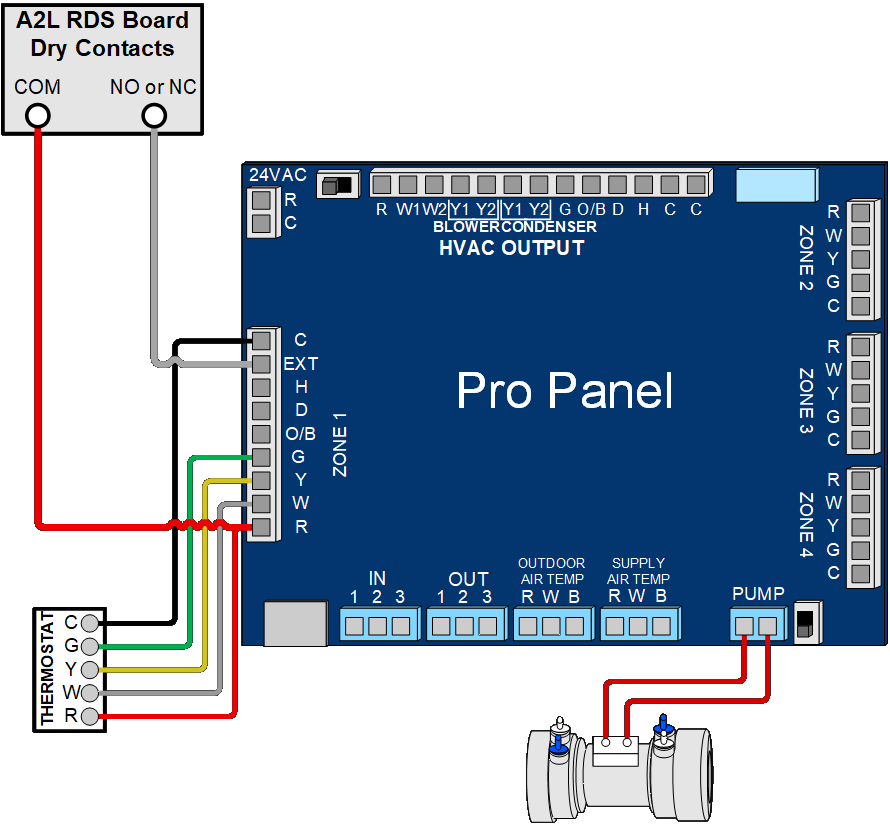
A2L Mitigation for Pro Panel (PDF)
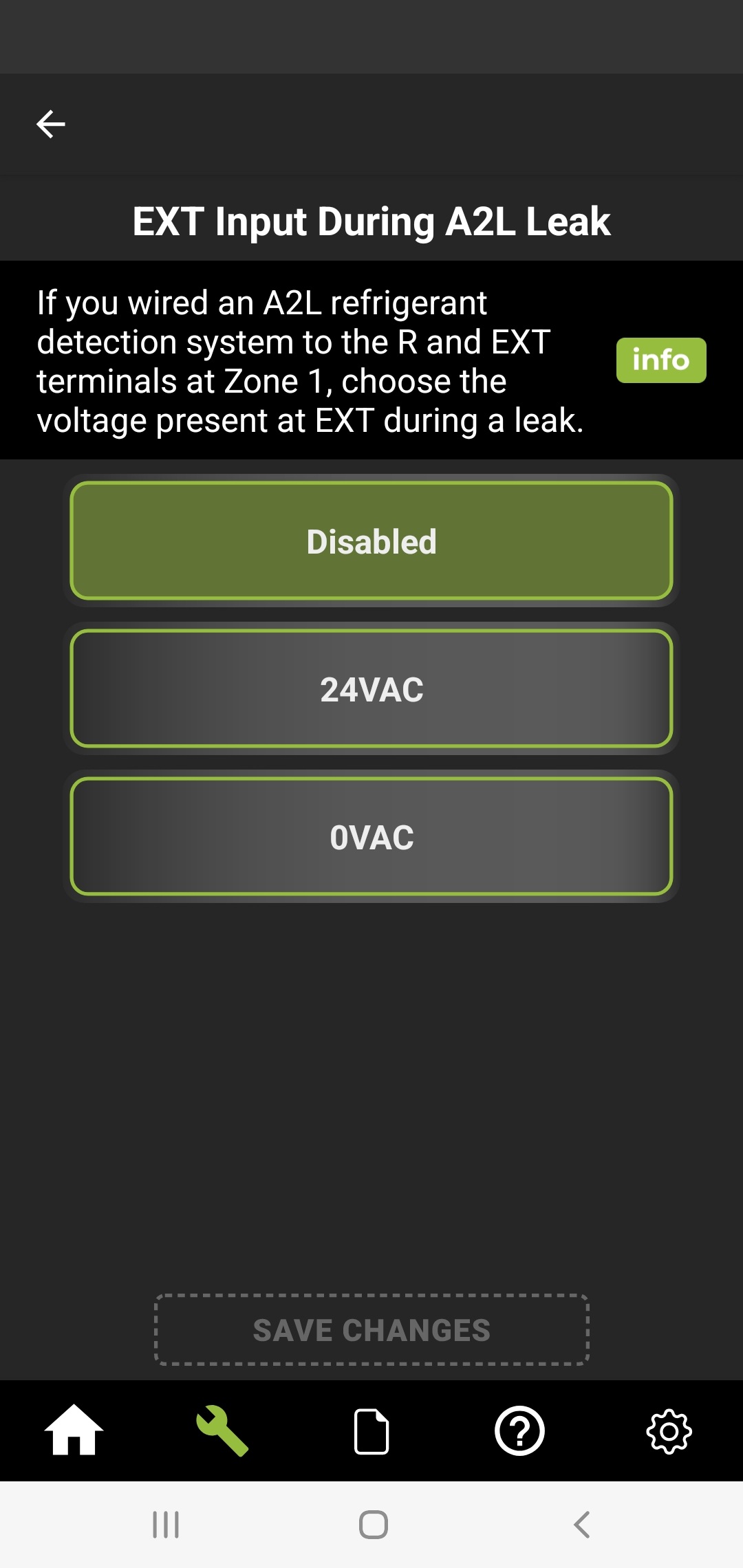
After you wire to the mitigation board, use the Arzel Pro app to tell the Pro Panel whether the contacts are normally open or normally closed. Find the setting called EXT Input During A2L Leak. If the dry contacts close when there is a leak, select 24VAC. If the dry contacts open when there is a leak, select 0VAC.
When the RDS board signals that there is a leak, the Pro Panel will:
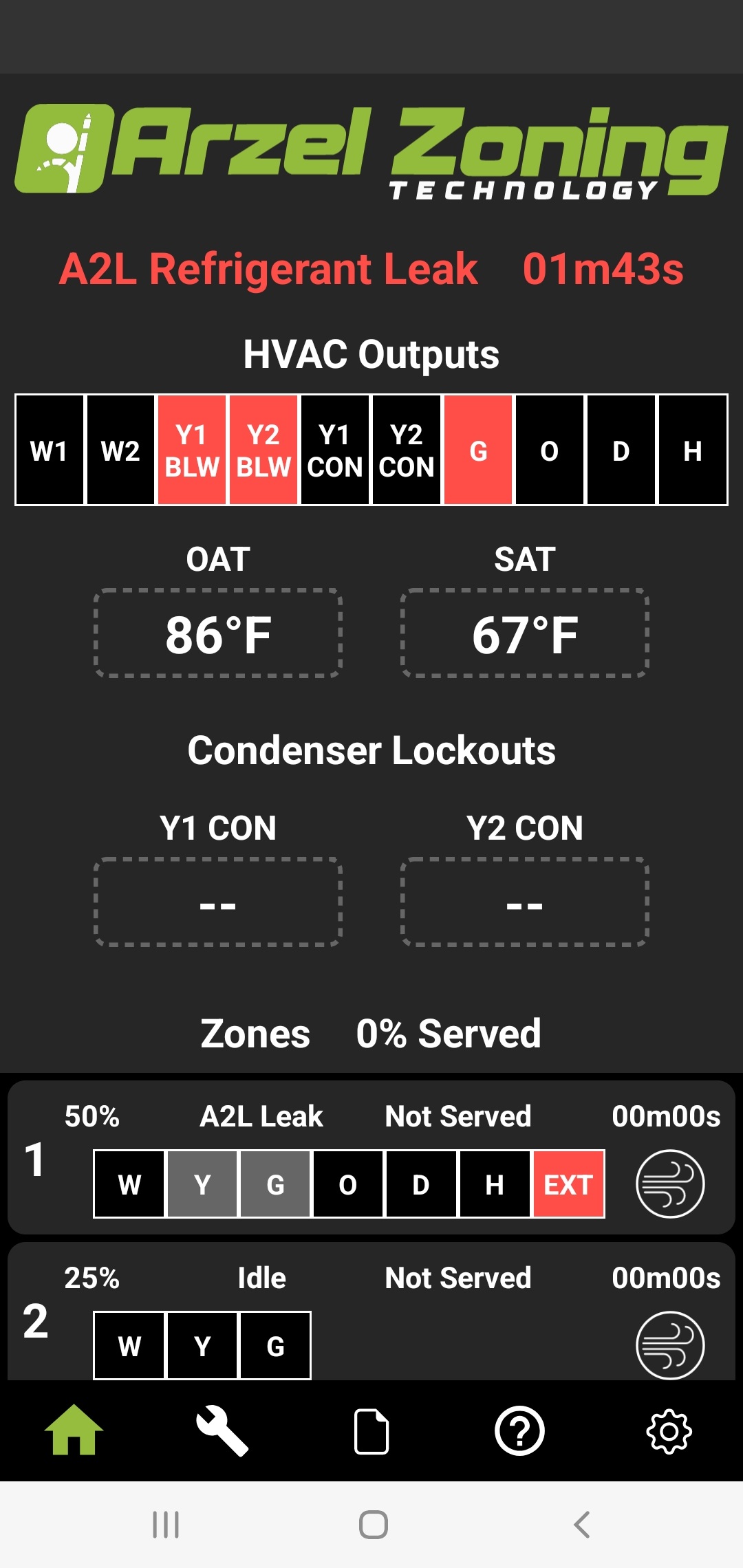
The Pro Panel will make sure that the condenser turns off and the fan runs when there is a leak. That means you can wire the HVAC outputs on the Pro Panel directly to the equipment, instead of wiring through the mitigation board.
When you are using an Arzel Zoning system other than our Pro Panel, you will need to wire a double-pole double-throw relay to the mitigation board and the Arzel Zoning panel. This will shut off the panel and open all dampers in the event of a refrigerant leak.
Find the dry contacts on the mitigation board for connecting an accessory. These will often be labeled ZONING or ALARM. Then, use a multimeter to check whether those contacts open or close when there is a leak. Below are three wiring possibilities, depending on how your equipment’s RDS works.
Many mitigation boards have a set of dry contacts that close when there is a leak. You can use these contacts to energize the relay by following the wiring diagram below.
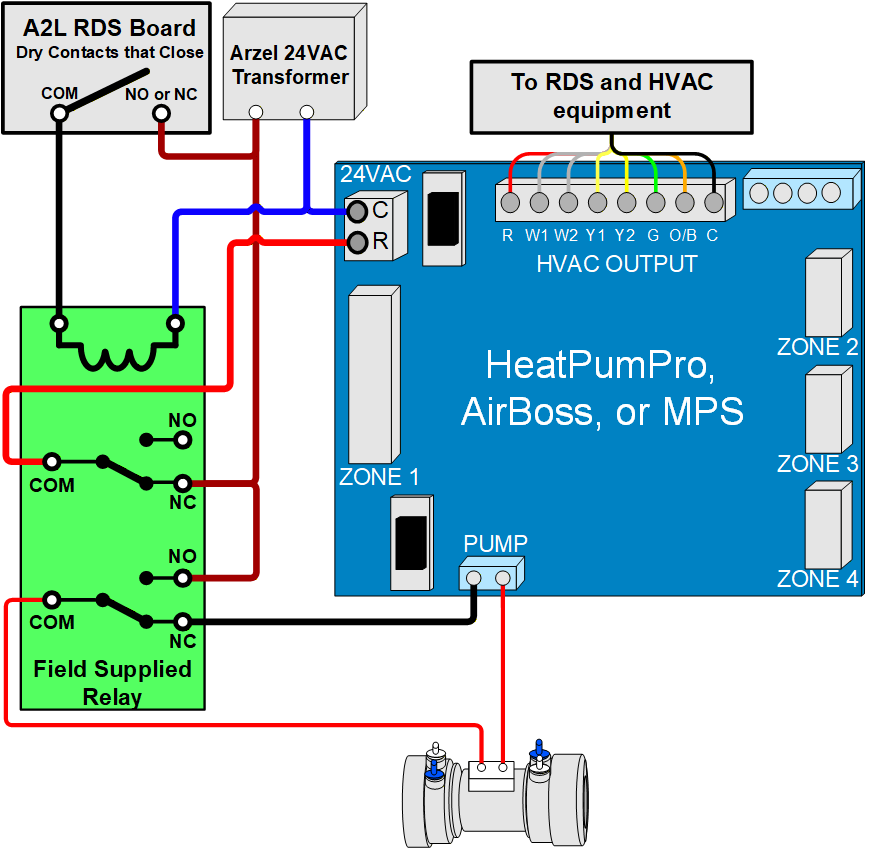
A2L Dry Contacts That Close (PDF)
Some A2L mitigation boards have a set of dry contacts that open when there is a leak. Below is a wiring diagram that shows this scenario.
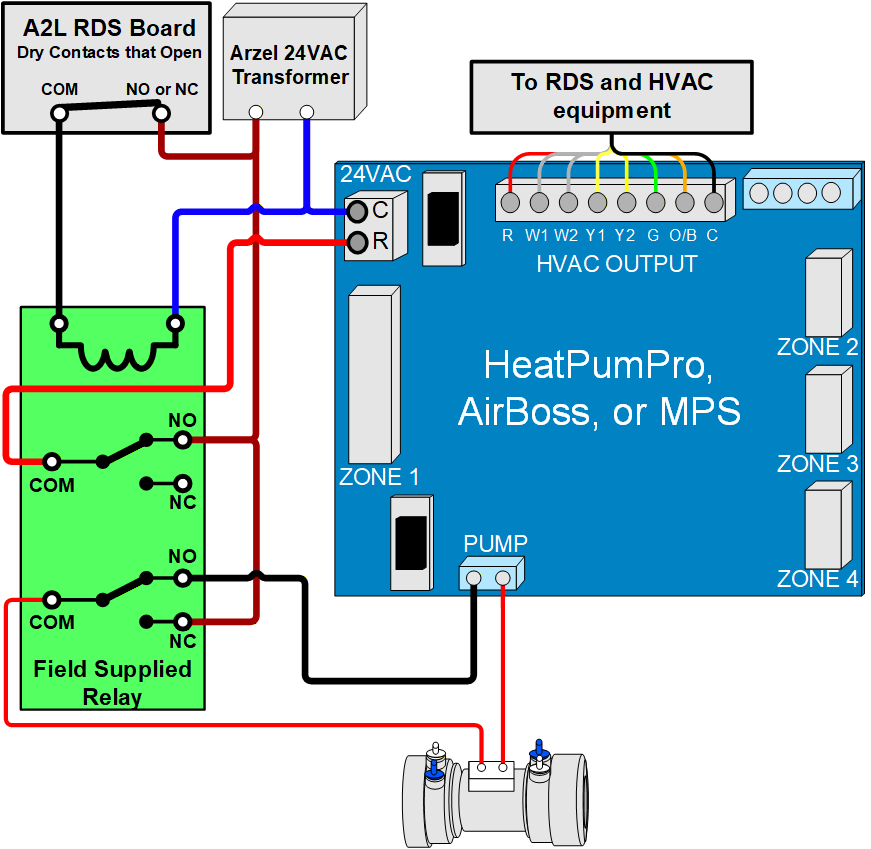
A2L Dry Contacts That Open (PDF)
If you’re working with Trane or American Standard equipment, you may not need to add the relay. These brands have some mitigation boards with extra contacts that you can use to wire the mitigation board to the Arzel Zoning board. Here’s how to use this wiring method.
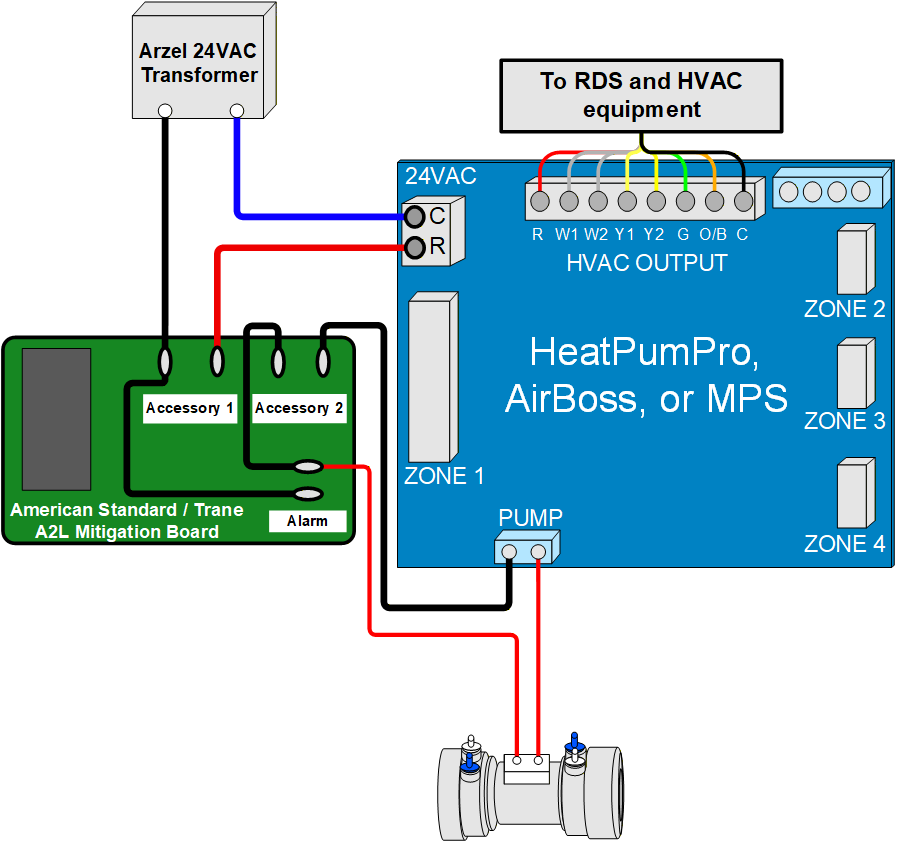
A2L Trane / American Standard (PDF)
Okay, so you added the relay for A2L mitigation. Now what? Here’s what will happen if the A2L control detects a leak:
Even if you aren’t using one of the wiring methods above to open the dampers, the RDS is still responsible for shutting off the heating and cooling in the case of a leak. For the AirBoss and MPS panels, follow the A2L equipment manufacturer’s wiring diagram to connect the zoning panel to the RDS. Treat the HVAC output on the Arzel Zoning board as the thermostat. With the AirBoss and the MPS, the mitigation board will interrupt the signals for heating and cooling just like it would with a standard 24VAC thermostat.
With the HeatPumPro, you may have to take extra steps to wire the HVAC outputs to the mitigation board and the equipment. The HeatPumPro has separate Y1/Y2 contacts for controlling the blower and the condenser separately, and the signal to the condenser should always be turned off when a leak is present.
Many RDS boards turn off the condenser by breaking the R wire to our HVAC outputs. RDS boards under the Amana, Daikin, Lennox, and Armstrong brands typically operate this way. For those boards, wire the HVAC outputs as shown below.
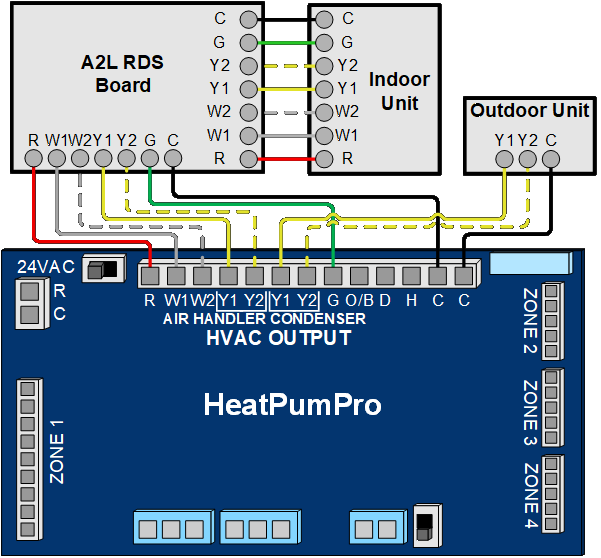
A2L HeatPumPro – RDS Breaks R (PDF)
Other mitigation boards turn off the condenser by breaking the Y wire to the outdoor unit. Many Carrier, Bryant, Trane, and American Standard mitigation boards break Y and W to turn off heating and cooling, and energize G to turn on the fan. The diagram below shows how to wire a HeatPumPro with a mitigation board like this.
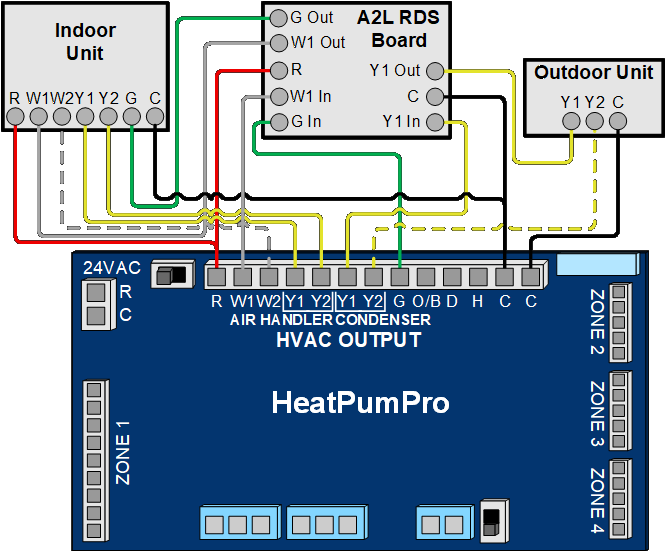
A2L HeatPumPro – RDS Breaks Y (PDF)
NOTE: For Bosch systems, we always recommend using the Pro Panel to simplify wiring to the mitigation board. However, you can wire a Bosch system with A2L refrigerant to a HeatPumPro if necessary. You have to use a field-supplied relay to wire a Bosch A2L system to a HeatPumPro when using the separate Y1/Y2 contacts.
If you have additional questions about A2L refrigerants and Arzel Zoning, give us a call at 1-800-611-8312 or send a message to our tech support team. You can also refer to this list of Arzel wiring diagrams.
How Many Stages Can the Pro Panel Control? The Pro Panel can handle up to two stages of cooling and up to four stages of heating. It can control multi-stage furnaces, air conditioners, and heat pumps. For example, it can control a two-stage heat pump with two stages of electric heat strips. Or it can […]
The Pro Panel is a universal zoning system. That means it can control every type of equipment: conventional furnace and air conditioner, split and package geothermal, heat pump, dual-fuel systems, and all-electric systems. The Pro Panel works with multi-stage equipment too, up to 4 stages of heat and 2 stages of cooling. We worked to […]
There are three main steps to installing a Pro Panel zone control system: Install the dampers and tubing. Install the panel and thermostats. Connect to the Arzel Pro app to configure the Pro Panel for your installation. After you complete these three steps, your customer will feel the difference immediately. This is one of our […]
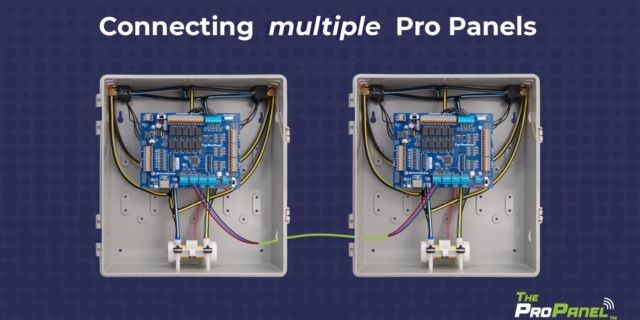
Our new Pro Panel control can zone up to 16 zones. That’s twice as many as our biggest AirBoss, and four times what our HeatPumPro can do. With 16 zones possible, the Pro Panel can be a zoning solution for more light commercial buildings and large houses. On top of the additional zones that are […]